
About this app
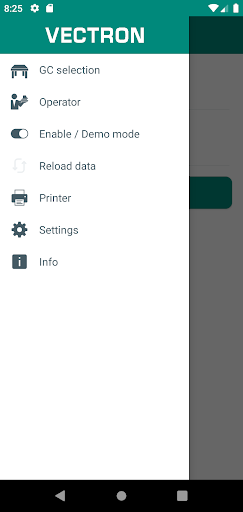
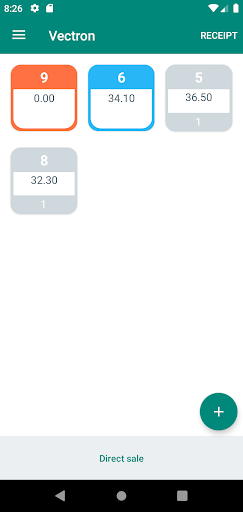
The “Vectron MobileApp” completes stationary Vectron POS systems by professional options for mobile order taking, guest check management and payment in the hospitality trade.
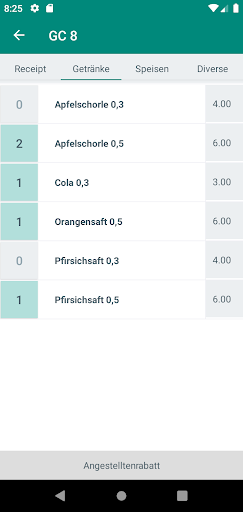
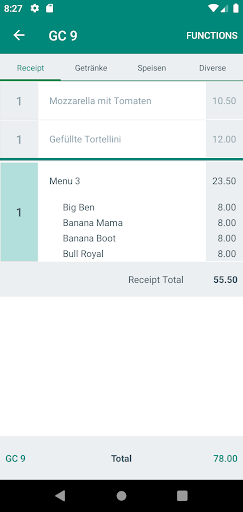
To guarantee fast and intuitive processes, the operation of the “Vectron MobileApp” follows the stationary Vectron POS systems. PLU selection takes place via main groups and departments. The “Vectron MobileApp” contains an informative GC overview and supports discounts, cash-, and credit card- and EC-card payment.
The demo mode, which you can use without connection to a stationary Vectron system for training purposes, already contains an example layout of a menu. For use in hospitality you require the network connection to a stationary Vectron system.
The following features will be supported:
• Login to a Vectron POS system
• Operator log in-/out
• GC selection
• Display of open GCs
• Display and selection of main groups
• Display and selection of selection windows
• PLU selection incl. linked selection windows
• Search function in PLU selection
• Display of GC entries and booking
• Extra items
• Quantity to be changed subsequently (in open receipt); quick function to set the quantity to 0
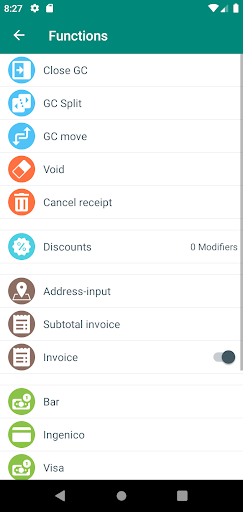
• Granting of discounts
• Modifiers
• Media finalization (no partial payment, no calculation of change) with print control
• Display of subtotal
• Cancel receipt
• Free multiplier- and price input
• Course sequence (modifier)
• Print functions selectable (entertainment expenses, invoice)
• Expanded GC split (invoice, other GC)
• Void
• Printer selection in App possible (e.g. WLAN belt printer)
AS OF AUGUST 2020
• Support of Vectron selection windows
• Payment with bonVito vouchers
• Payment with myVectron vouchers
• Support of EFT terminals (ZVT protocol)
• Partial payment options
• Tip/change calculation for cash payments
• Tip for EFT payments
• Support of countdown PLUs
• Direct sale as permanent option
• Digital receipt
Please make sure that you always use the latest VPOS version and scripts in order to use all the features.
Downloads
1.2.3.4.5.6.7.8.9.0
LATEST
10/02/2024
Download
15.75 MB
1.2.3.4.5.6.7.8.9.0
LATEST10/02/2024
Supported Architectures
MD5 Checksum
c15fe014583d881de1414ca440529b1d
Minimum SDK Version
22
Version Code
155
Upload Date
Oct 2, 2024, 7:32:07 PM
1.2.3.4.5.6.7.8.9.0
09/25/2024
Download
15.75 MB
1.2.3.4.5.6.7.8.9.0
09/25/2024
Supported Architectures
MD5 Checksum
41fe2652fbf10918675e6919fb07c82a
Minimum SDK Version
22
Version Code
150
Upload Date
Sep 25, 2024, 7:31:59 PM
1.2.3.4.5.6.7.8.9.0
12/23/2023
Download
15.69 MB
1.2.3.4.5.6.7.8.9.0
12/23/2023
Supported Architectures
MD5 Checksum
c6bb07aefa80670e330c65b8f2c596e8
Minimum SDK Version
22
Version Code
135
Upload Date
Dec 23, 2023, 7:24:30 AM
Similar Apps

First Foundation Card Control
5.0
everyone

OnTheGo Pay
5.0
everyone

Learn Forex Trading
5.0
everyone

HSBC Bangladesh
5.0
everyone

SET e-Book Application
5.0
everyone

Currency Converter Pro
5.0
everyone

BVM Mobile
5.0
everyone

Community Lending
5.0
everyone

USHG Digital Wallet
5.0
everyone

Nature Collectibles
5.0
everyone