


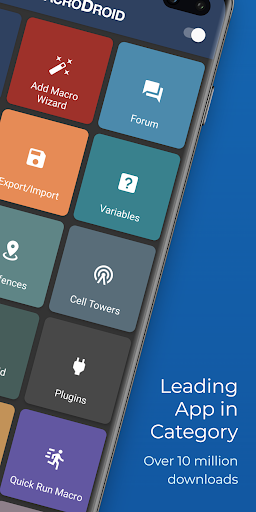


About this app
Turn your Android device into a smart assistant that works for you. MacroDroid is the easiest way to automate almost anything on your phone or tablet — no coding required, just a few taps.
What can you automate?
✦ Auto-reject calls when you're in a meeting (synced with your calendar)
✦ Read incoming messages aloud while driving and reply hands-free
✦ Switch on Bluetooth and start your music the moment you enter the car
✦ Turn on Wi-Fi automatically when you arrive home
✦ Save battery by dimming the screen and disabling radios at night
✦ Create custom sound and notification profiles for work, sleep, or the gym
✦ Get reminded about tasks with timers, stopwatches and location alerts
✦ Keep your storage tidy by automating file copy, move and delete tasks
These are just a handful of ideas — the possibilities are virtually endless.
How it works — 3 simple steps
1. Pick a Trigger
Choose what kicks off your macro. MacroDroid offers over 120 triggers, including location (GPS, cell towers, geofences), device status (battery, app launches, data usage), sensors (shake, light, proximity, fold angle), and connectivity (Bluetooth, Wi-Fi, notifications, webhooks). You can also launch macros manually with a home screen shortcut or the customisable MacroDroid sidebar.
2. Choose your Actions
Decide what happens next. Pick from over 200 actions: connect to devices, adjust volume, speak text aloud, send messages, control media, take screenshots, dim the screen, run Tasker plugins, and much more. Chain multiple actions together to build powerful workflows.
3. Add Constraints (optional)
Fine-tune when your macros run. With over 80 constraints, you can limit a macro to certain days, times, locations, or device states — for example, only connecting to office Wi-Fi during working hours.
Designed for everyone
New to automation? Get started in seconds with the built-in Template store — browse hundreds of ready-made macros shared by the community, install one with a single tap, and tweak it to fit your needs. The in-app help and active user forum mean you're never stuck for long.
Power user? Dive deeper with user-defined variables, dictionaries and arrays, intents, scripting, IF / THEN / ELSE logic, AND/OR conditions, loops and Tasker/Locale plugin support.
Free vs Pro
The free version is ad-supported and lets you create up to 5 macros. Upgrade to Pro with a small one-time payment to remove all ads and unlock unlimited macros — no subscriptions, ever.
Wear OS Companion
MacroDroid includes a Wear OS companion app for triggering and interacting with your macros from your wrist, including watch face complications. The phone app is required.
Accessibility Services
Some features (such as automating UI interactions) use Android's accessibility services. This is entirely optional and at your discretion. MacroDroid never collects or logs any user data through accessibility services.
Support & Community
Join thousands of users in our active community forum at http://www.macrodroidforum.com — the best place for usage questions, feature requests and macro-sharing inspiration. To report a bug, use the in-app "Report a bug" option in the Troubleshooting section.
---
Stop doing the same things over and over. Let MacroDroid do them for you.
Downloads
1.2.3.4.5.6.7.8.9.0
LATEST
07/03/2026
Download
92.4 MB
1.2.3.4.5.6.7.8.9.0
LATEST07/03/2026
Supported Architectures
MD5 Checksum
258466813a4abb0a48bd9d388b10c107
Minimum SDK Version
23
Version Code
1496500009
Upload Date
Jul 3, 2026, 10:07:58 AM
1.2.3.4.5.6.7.8.9.0
06/12/2026
Download
91.23 MB
1.2.3.4.5.6.7.8.9.0
06/12/2026
Supported Architectures
MD5 Checksum
1d34897f22d48f21a4df7bd4ca06376f
Minimum SDK Version
23
Version Code
1496400011
Upload Date
Jun 12, 2026, 11:28:40 AM
1.2.3.4.5.6.7.8.9.0
05/08/2026
Download
89.77 MB
1.2.3.4.5.6.7.8.9.0
05/08/2026
Supported Architectures
MD5 Checksum
b4c994891972e21db72ca8c3d5657eda
Minimum SDK Version
23
Version Code
1496300015
Upload Date
May 8, 2026, 10:23:16 AM
1.2.3.4.5.6.7.8.9.0
01/19/2026
Download
79.08 MB
1.2.3.4.5.6.7.8.9.0
01/19/2026
Supported Architectures
MD5 Checksum
88bd5071d652762e976d03b1a82b7770
Minimum SDK Version
23
Version Code
1496000009
Upload Date
Jan 19, 2026, 10:18:59 AM
1.2.3.4.5.6.7.8.9.0
12/11/2025
Download
78.42 MB
1.2.3.4.5.6.7.8.9.0
12/11/2025
Supported Architectures
MD5 Checksum
cf8fa9f4a0fca2f70035a8ba706d3ee9
Minimum SDK Version
23
Version Code
1490000012
Upload Date
Dec 11, 2025, 8:45:05 AM
1.2.3.4.5.6.7.8.9.0
12/09/2025
Download
78.57 MB
1.2.3.4.5.6.7.8.9.0
12/09/2025
Supported Architectures
MD5 Checksum
307fb12f912d4869e852b5546c62cc63
Minimum SDK Version
23
Version Code
1490000011
Upload Date
Dec 9, 2025, 7:52:26 PM
1.2.3.4.5.6.7.8.9.0
08/11/2025
Download
98.87 MB
1.2.3.4.5.6.7.8.9.0
08/11/2025
Supported Architectures
MD5 Checksum
4d909e915159649d1fe08a7be12124b0
Minimum SDK Version
23
Version Code
1456000009
Upload Date
Aug 11, 2025, 1:28:15 PM
1.2.3.4.5.6.7.8.9.0
07/22/2025
Download
97.99 MB
1.2.3.4.5.6.7.8.9.0
07/22/2025
Supported Architectures
MD5 Checksum
9aa33d0e748a0a3f3ed0237e124bdd57
Minimum SDK Version
23
Version Code
1455000009
Upload Date
Jul 22, 2025, 3:26:40 PM
1.2.3.4.5.6.7.8.9.0
06/10/2025
Download
73.62 MB
1.2.3.4.5.6.7.8.9.0
06/10/2025
Supported Architectures
MD5 Checksum
28ad77de88fced47286aadbe3029da9b
Minimum SDK Version
23
Version Code
1454000009
Upload Date
Jun 10, 2025, 9:32:44 AM
Similar Apps

Australian VPN Unlimited Proxy
5.0
everyone
Epson Spectrometer
5.0
everyone

Prospect Link
5.0
everyone

Nepal VPN - Get Nepal IP
5.0
everyone
Fast PDF Reader: Read PDF
5.0
everyone
Storage Manager Shortcut
5.0
everyone

Document Scanner - Scan to PDF
5.0
everyone

Master Management Connect
5.0
everyone

G-NetView Lite
5.0
everyone

Eco Weee
5.0
everyone