




About this app
Nature & landscape wallpapers in high resolution for Android — from Full HD (1080p) up to QHD, UHD, and 4K.
HD backgrounds for phones and tablets: pick an image that fits your screen and looks sharp.
Find the right wallpaper faster with categories, tags, and a handy color search.
If you’re looking for landscape wallpapers, nature backgrounds, or scenic phone wallpaper, you can browse, preview, and set them in a few taps — without guessing how they’ll look on your device.
What’s inside
• Nature and scenic landscape images in multiple resolutions.
• Manual moderation: pictures are reviewed before they’re added to the catalog.
• 70+ categories, plus sorting by newest, rating, and popularity.
• Preview, cropping, and separate setup for Home screen and Lock screen.
• Favorites, scheduled auto-change, downloads, and day/week notifications.
Browse & search your way
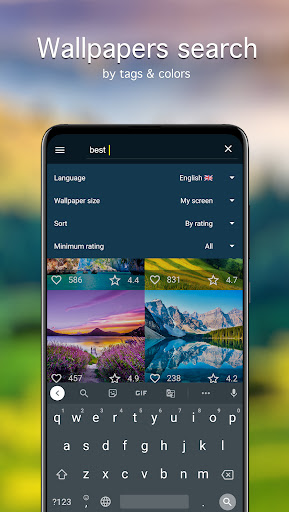
Categories help you explore, tags help you narrow down, and search helps you jump straight to what you want.
• Keyword search: find backgrounds by words.
• Color search: choose a dominant color to match your theme, icons, or UI accents.
• Sorting: check Newest first, or use Rating/Popularity to discover top picks quicker.
Quality before you apply
• Resolution: Full HD (1080p) and higher — QHD, UHD, 4K.
A wallpaper can look different depending on your screen ratio — so you can prepare it before setting:
• Preview on your device.
• Crop/fit so the image is centered and clean.
• Adjust preview quality to reduce mobile data usage while browsing.
Set wallpapers how you prefer
• Apply to Home screen only, Lock screen only, or both.
• Support for different screen resolutions on smartphones and tablets (including tablet wallpaper setups).
Favorites & auto-change
Build your own set of go-to images:
• Add pictures to Favorites for quick access.
• Auto-change on a schedule: choose a source (for example, Favorites) and an interval, and the background will update automatically.
• Use it as a simple wallpaper changer when you want a fresh look regularly.
Download & save for later
• Save images to your Gallery for deferred installation.
• Save to an SD card if your device supports it.
Notifications
Get reminders for “Picture of the Day” and “Picture of the Week”.
Messengers
Use a selected image as a chat wallpaper in WhatsApp and other messengers.
Getting started
1) Pick an image → Preview.
2) Crop if needed.
3) Tap Set → choose Home screen, Lock screen, or both.
The collection is supported by the 7Fon team.
Downloads
Similar Apps
AI Walls
5.0
everyone

One 7 - IconPack
5.0
everyone
Gothic Forest Green Icons
5.0
everyone
Autumn KWGT
5.0
everyone

Breeze KWGT
5.0
everyone
Cool Nature Wallpapers 4K | HD
5.0
everyone

Cool Dodge Car Wallpaper 4K HD
5.0
everyone
Stacked Red Icons
5.0
everyone
Wallpapers For Huawei HD - 4K
5.0
everyone
BeeLine Green Iconpack
5.0
everyone